Free during early access

A searchable memory for your garden.

Track every planting, harvest, and event across all your beds and gardens. Know what worked, what failed, and what's ready to pick. Season after season.

Roma Tomatoes — Bed 2
  • 12 Oct
    planted
    6 Roma seedlings in Bed 2
  • 19 Oct
    fertilised
    Seaweed solution applied
  • 28 Oct
    photo
    Strong growth, staked
  • 12 Dec
    harvested
    1.8 kg tomatoes — excellent
  • 20 Jan
    pest
    Leaf curl after hot week
  • 5 Feb
    removed
    End of season — 18.4 kg total
Full
History, no limits ever
50+
Plant care event types
AI
Powered insights & planning
Free
During early access

Capture everything. Get intelligence back.

MyPlot works in two directions. You build your garden's memory by logging what happens. The app turns that memory into useful insights and plans.

Capture & Design
Build your garden's memory

Log plantings, events, harvests, and observations as they happen. Design your layout on a scaled canvas. Every piece of data you add makes the app more useful.

→ Garden Designer → Walk Session → Harvest Tracking
Insights & Action
Get intelligence from your data

Your records power AI tools that know your specific garden. Ask questions, get seasonal plans, receive weekly briefings built from what's actually happening in your space.

→ Sprout AI Assistant → AI Garden Planner → All features

Everything a serious gardener needs

Not a plant encyclopedia. Not a reminder app. A proper logbook that builds up knowledge about your specific garden over time.

Plant inventory

Track every planting with variety, method, quantity, source, and status. Plant profiles are separate from your garden records, so Roma tomato knowledge stays useful across seasons.

Full event timeline

Every planting has a timeline. Watered, fertilised, pruned, pest observed, harvested, removed. 17 event types so nothing gets lost. This is where the app becomes genuinely useful.

Harvest tracking

Log every harvest with weight, quantity, and quality. See which beds produce the most, which varieties outperform, and how your output compares season to season.

Smart reminders

Set reminders manually or let the app suggest them based on what you've planted. Water, fertilise, prune, sow, harvest. Tied to real plantings, not generic schedules.

Gardens, beds & areas

Organise by garden, then by bed, zone, pot, or orchard row. Track soil, irrigation, sun exposure, and dimensions. See the full planting history of any area at a glance.

Visual garden designer

Drag and drop your beds onto a scaled grid of your garden. Resize them to match real dimensions, reposition as your layout changes, and see the whole space at a glance.

Household, team & client sharing

One invite code links accounts. Partners, family, or a whole team all share the same garden, same plantings, same history. Fully symmetric access. Works for household gardeners, market growers managing staff, or anyone giving a client a live view of their space.

Photo journals

Attach photos to any planting, bed, harvest, or event. Watch your garden change over time and look back at exactly what a bed looked like before you replanted it.

Extensive plant library

A curated database of vegetables, herbs, fruit trees, natives, ornamentals, and more. Includes spacing, care notes, and companion planting guidance. Search by common name or botanical name.

Harvest reports

Total yield by plant, bed, or season. See your best-performing varieties, find which area produces the most food, and track how output changes year on year.

Bed history & reports

See everything ever planted in a bed, season by season. Invaluable for rotation planning. Per-bed reports show yield, planting count, and harvest history all in one place.

Customisable dashboard

A 22-card dashboard you build yourself. Choose which cards to show, drag to reorder, resize from compact to full-width, and add from a library of 15 optional cards. Your garden, your layout.

Seasonal planning

Plan ahead by season. Create a planting plan for your garden, map out what goes where, and track which planned plantings have been carried out and which are still pending.

Clone & repeat plantings

Replanting the same thing next season? Clone any planting in one click. It copies all the details so you can adjust what changed and start a fresh timeline from there.

Live watering recommendations

MyPlot reads your local 7-day forecast and tells you exactly when to water and when to hold back. Heavy rain coming? Skip. Hot week ahead? Water morning and evening.

Voice Walk Session

Walk your garden, speak what you see, save everything in one go. Say "planted a fig tree" and MyPlot creates the planting record. No typing, no unlocking your phone between plants.

AI weekly briefing

Every week, MyPlot reads your plantings, recent events, and upcoming forecast and writes you a personalised garden note: what needs attention, what's on track, and what's worth doing this week. No setup required.

See your whole garden, not just a list

Drag your beds onto a scaled grid of your actual garden. Resize them to match real dimensions, reposition when things change, and see at a glance what's where and what's in it.
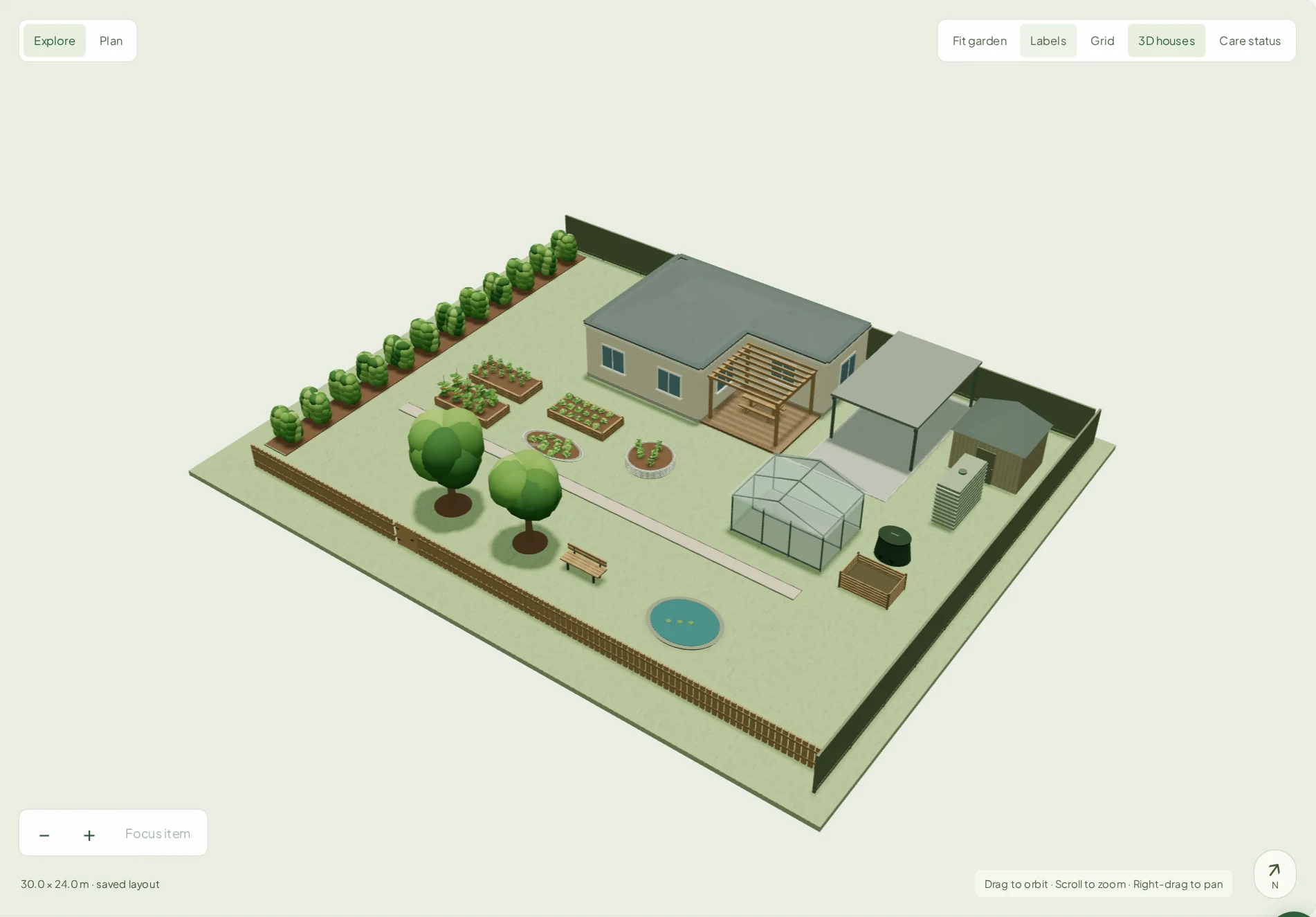
  • Each cell is 1 metre. The grid matches your real space.
  • Drag to place, drag the corner to resize
  • Beds are colour-coded by status: overdue, due soon, all good, empty
  • Click any bed to see what's planted and jump straight to it
  • Split a bed across multiple grid segments for irregular shapes
Backyard — Layout + Bed
BEDS
Tomato bed
2 segments · raised bed
Herb spiral
1 segment · in ground
Brassica row
1 segment · raised bed
Compost bay
0 segments
TOMATO BED
TOMATO BED
HERB SPIRAL
BRASSICA ROW
Overdue Due soon All good Empty
Read more about Garden Designer →

Your garden at a glance, your way

The dashboard isn't fixed. Choose from 22 cards, arrange them however you like, resize each one, and hide anything you don't need. Every gardener's home screen ends up different.

  • Drag cards to reorder. Hold and drop anywhere on the grid
  • Six sizes: compact, normal, half, third, three-quarters, full-width
  • Hide any card you don't use. Restore it any time from the library
  • 15 optional cards in the library: harvest ready soon, bed occupancy, year-on-year comparisons, AI suggestions, and more
  • One click to reset to defaults if you want a clean slate
My garden
+ Add cards ✦ Customise
Weather
22 °C  ·  Mostly sunny
No rain expected — water this evening
Wed
☀️
Thu
Fri
🌧
Sat
☀️
Garden summary
14
active plantings
Reminders
Water tomatoes — overdue
Fertilise brassicas — today
Season harvest
18.4 kg
↑ 22% vs last season
Active plantings
Roma TomatoesBed 2
Kale — TuscanBed 4
BasilHerb spiral
Recent harvests
Tomatoes · 1.2 kgyesterday
Zucchini · 3 fruitMon
Basil · 45 gSat
✦ Edit mode — drag to reorder · click to resize · hide unwanted cards Done

Every card can be resized independently. The 12-column grid means sizes always line up neatly.

Full  (12 cols)
Three-quarters  (9 cols)
Quarter  (3)
Half  (6 cols)
Half  (6 cols)
Third  (4)
Third  (4)
Third  (4)
Compact (2)
Compact (2)
Compact (2)
Compact (2)
Compact (2)
Compact (2)

Tell it what you want to grow. Get a full plan.

Describe your goals, available beds, and timing preferences. The AI planner reads your garden history, checks what's already in the ground, and produces a detailed seasonal planting schedule with variety suggestions, spacing, and follow-up steps.

  • Built from your actual garden: beds, current plantings, past seasons
  • Suggests what to plant, when, and where. Includes succession timing
  • Considers companion planting and crop rotation from your history
  • Generates follow-up reminders and a planner card on your dashboard
  • Save multiple plans. Draft, refine, and track what's been carried out
AI garden planner AI
What do you want to grow this season?
Focus on tomatoes, beans, and leafy greens for summer. Have 3 raised beds free.
Garden Backyard
Start Oct 2026
Build plan
Plan generated — Summer 2026/27
Roma Tomatoes
Beds 2 & 3 · 6 seedlings each · stake at 30 cm
Plant Oct
Climbing Beans
Bed 4 · direct sow · trellis required
Sow Nov
Tuscan Kale
Bed 5 · succession sow every 3 weeks
Sow Oct–Dec
Companion tip: Basil near tomatoes in Bed 2 — repels aphids. Your history shows good results with this pairing.
Read more about the AI Garden Planner →
Walk Session Stop
pruned the lemon tree…
planted two cherry trees along the south fence planted
watered the whole orchard this morning watered
spotted scale on the olive leaves again observed
applied Osmocote to the fig and apple fertilised
Review & Save
AI classifies each entry automatically

Log your whole garden in a 5-minute walk

Walk Session turns your voice into structured garden records. Speak naturally as you move through your garden | MyPlot listens, transcribes, and uses AI to classify everything you said into the right action types.

  • Say "planted a fig tree" and a real planting record is created and linked to the plant database
  • Pause, resume, and keep walking. Cards stack up as you go
  • Review AI classifications before saving. Change anything that's wrong
  • One tap saves everything: observations, harvests, pruning, new plantings
  • Works best as a PWA. Install to your home screen for instant access
Read more about Walk Session →
Sprout, your AI assistant

Your garden, always in context.

Sprout knows your beds, your current plantings, your harvest history, and your local weather. Ask it anything. Tell it what you just did and it'll log it for you, ready to confirm before anything is saved.

  • Reads your actual garden: beds, plantings, and recent events
  • Checks your local 7-day forecast before making watering calls
  • Logs events in a draft/confirm step. You're always in control
  • Searches the plant library for care info and companion tips
  • Lives in a floating panel, always one tap away in the app
  • Uses your GPS to know which plant you're standing next to. No need to specify
Knows your garden Weather-aware Draft before saving Plant library access GPS-aware
Sprout
AI
Context: 14 active plantings Backyard 22 °C · sunny
What should I water today?
Sprout
No rain until Friday — here's where things stand based on your plantings and the forecast:
Roma Tomatoes · Bed 2 Water tonight
Climbing Beans · Bed 4 Water tonight
Tuscan Kale · Bed 5 Can wait
Log that I fertilised the tomatoes just now
Draft event — confirm to save
Event Fertilised
Plant Roma Tomatoes
Location Bed 2 · Backyard
Date Today
Save event
Edit
Ask anything about your garden…
Read more about Sprout →
Nearby plants ● GPS active
W 12m away W 84m You Nearby Far
Sprout identified
Wattle — back paddock
Acacia dealbata · active
12m
Wattle — front paddock
Acacia dealbata · active
84m
GPS resolves which plant you mean, automatically

Sprout knows which plant you're standing next to

Tag your plantings with their GPS location once. After that, when you say "the wattle looks rough" while standing near it, Sprout already knows which wattle you mean. The one at the back paddock, not the one in the porch. No need to specify.

  • Tap once to tag a planting's location. GPS does the rest
  • Resolves duplicates automatically: two wattles, two fruit trees, two of anything
  • Works during Walk Sessions. Location updates as you move
  • Fails gracefully. If GPS is unavailable, Sprout simply asks which one you mean

Simple by design

Three things. Set up your garden. Record what happens. Let the history do the work.

1

Set up your garden

Add your garden, create your beds and areas: raised beds, pots, orchard rows, greenhouses. Set soil notes, irrigation type, and sun exposure once.

2

Record your plantings

Add what you've planted, when, where, and how many. Link to the plant database for care notes or create your own record. Every planting gets its own timeline.

3

Log as you go

Add events as things happen: watering, harvests, pest sightings, photos. After a season or two you'll know exactly what your garden does and when.

Built for people who grow things seriously

Home vegetable gardeners

Finally know what was planted in each bed last year, which tomato variety produced best, and when to expect your broad beans to be ready.

Orchards & fruit growers

Track tree-by-tree care, pruning schedules, and fruit yields. Know exactly when each tree was last treated and how many kilos it produced this season.

Permaculture & mixed properties

Manage multiple zones across a large property. Native plantings, food forests, paddock areas. Each with their own history and maintenance records.

Couples & household gardeners

Garden together without doubling up. Link your accounts with an invite code and everything is instantly shared: same garden, same plantings, same history.

Useful AI, not gimmick AI

The AI in MyPlot is built from your own records. It summarises what actually happened in your garden, not generic advice from the internet.

  • Parse rough notes into structured timeline events
  • Suggest reminders when you add a new planting
  • Summarise a planting's full history in plain English
  • Generate care cards from the plant database
  • Weekly garden briefing: overview of your garden, weather, and upcoming tasks
  • AI garden planner: full seasonal planting schedules from a plain-English brief
  • Companion planting suggestions based on what you currently have growing
  • What to plant now: seasonal crop nudges matched to your available space
  • Pest & disease watch: weather-driven risk flags for your active crops
AI note parser
"planted six roma toms in bed 2 last weekend and gave them seasol"
Parsed:
Event: planted
Plant: Tomato — Roma
Quantity: 6
Area: Bed 2
Treatment: Seaweed solution
Date: inferred from "last weekend" — confirm?
Dashboard AI cards
COMPANION SUGGESTIONS
🌿 Basil near tomatoes repels aphids
🌼 Marigolds — Bed 4 edge nematode control
🧅 Spring onions with brassicas white butterfly deterrent
PEST & DISEASE WATCH
🌡 Heat stress High risk
32 °C+ forecast · water tomatoes morning & evening
🍄 Powdery mildew Medium
Humidity 80 %+ · check zucchini leaves

Free during early access

No credit card required. Full access while we build out the platform.

Hobby
$0 /month
For casual gardeners tracking one or two beds.
  • 1 garden
  • Up to 5 beds / areas
  • Unlimited plantings & events
  • Timeline & harvest tracking
  • Photo journals
  • Plant library access
  • Quick log
  • Live watering recommendations
  • Basic reminders
Get started
Professional / Enterprise
TBD
For landscaping businesses, garden managers, schools, councils, hospitals, and institutions managing multiple sites.
  • Everything in Grower
  • Unlimited properties & sites
  • Team & staff accounts with role-based permissions
  • Multi-site reporting across all locations
  • Client-facing garden reports & progress summaries
  • Branded PDF exports with your logo
  • Staff task assignment & scheduling
  • Sprout AI across all gardens & sites
  • BYO AI API key for higher usage limits
  • API access for integrations
  • Audit log & full activity history
  • Dedicated onboarding & priority support
Get in touch

Start recording your garden today.

Free account. No credit card. Takes two minutes to set up your first garden.

Create account

Already have an account? Sign in